일지
유니티 화면 비율 고정 처리...13
niamdank
2021. 10. 12. 18:43
유니티 함수의 문제점 해결
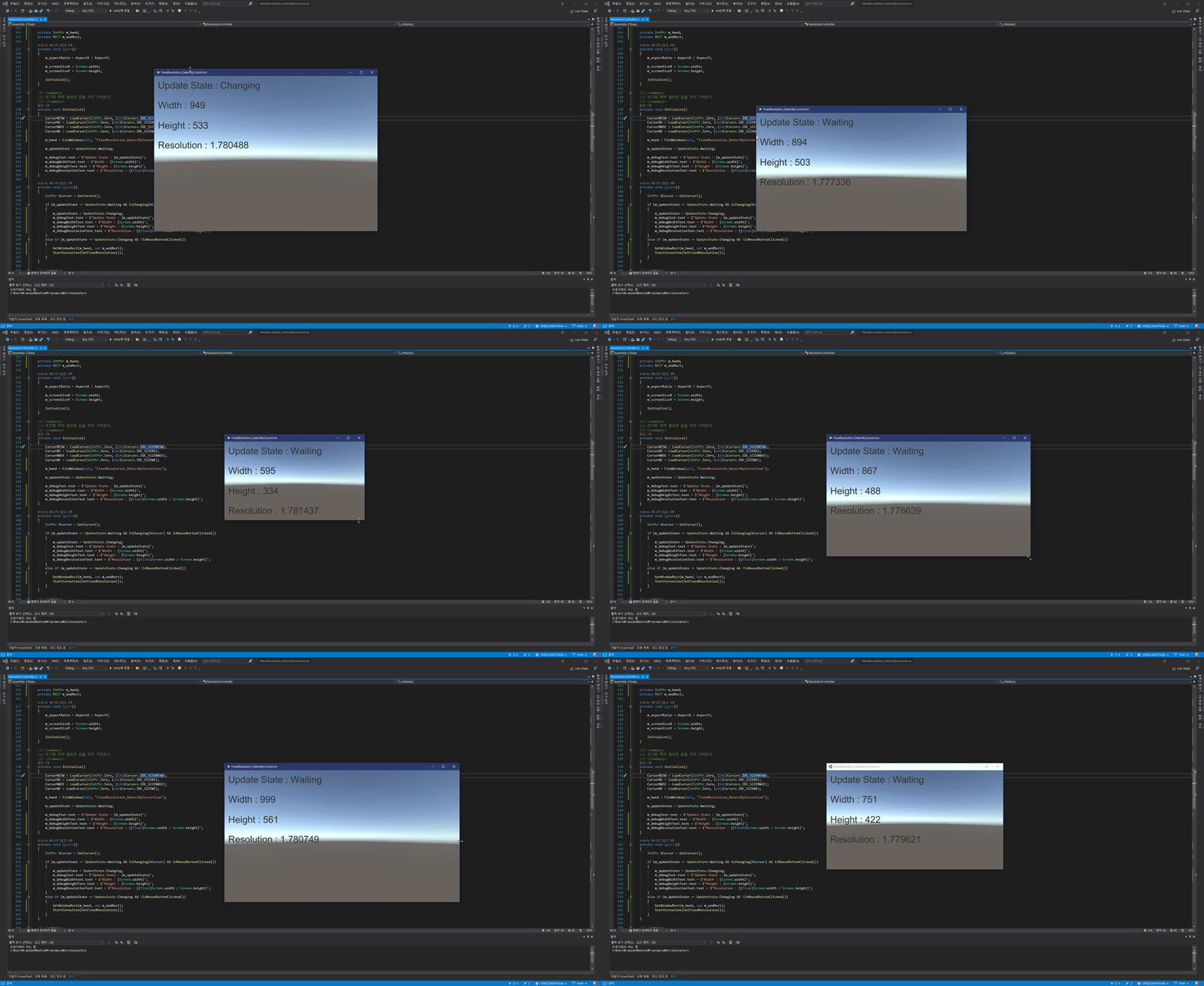
기존 유니티 함수가 가진 가운데로 정렬되는 문제를 해결하기 위해 WinAPI를 이용해 새롭게 구현한다.
ResolutionController.cs
using System;
using System.Collections;
using System.Runtime.InteropServices;
using UnityEngine;
using UnityEngine.UI;

public class ResolutionController : MonoBehaviour
{
	// 가로 고정 비율
	public float AspectX { get; set; } = 16;
	// 세로 고정 비율
	public float AspectY { get; set; } = 9;
	// 화면 크기 조정 할 횟수
	public int RefreshCount { get; set; } = 3;
	// 크기 조정 시 부드럽게 처리할지 여부
	public bool SmoothRefresh { get; set; } = true;
	// 크기 조절 모드
	public ResizeMode Mode { get; set; } = ResizeMode.MoveWindow;

	public Text m_debugText;
	public Text m_debugWidthText;
	public Text m_debugHeightText;
	public Text m_debugResolutionText;

	#region ENUMERATIONS
	private enum Cursors
	{
		IDC_ARROW = 32512,
		IDC_SIZENESW = 32643,
		IDC_SIZENS = 32645,
		IDC_SIZENWSE = 32642,
		IDC_SIZEWE = 32644,
	}

	private enum UpdateState
	{
		Waiting,
		Changing,
		Updating,
	}

	public enum ResizeMode
	{
		UnityDefault,
		MoveWindow,
	}
	#endregion

	#region WINAPI_DLL
	[StructLayout(LayoutKind.Sequential)]
	public struct POINT
	{
		public Int32 x;
		public Int32 y;
	}

	[StructLayout(LayoutKind.Sequential)]
	public struct RECT
	{
		public int Left;
		public int Top;
		public int Right;
		public int Bottom;
	}

	private const int VK_LBUTTON = 0x01;
	private const ushort KEY_HOLD = 0x8000;

	private const uint WS_OVERLAPPED = 0x00000000;
	private const uint WS_CAPTION = 0x00C00000;
	private const uint WS_SYSMENU = 0x00080000;
	private const uint WS_THICKFRAME = 0x00040000;
	private const uint WS_MINIMIZEBOX = 0x00020000;
	private const uint WS_MAXIMIZEBOX = 0x00010000;
	private const uint WS_OVERLAPPEDWINDOW = WS_OVERLAPPED | WS_CAPTION | WS_SYSMENU
		| WS_THICKFRAME | WS_MINIMIZEBOX | WS_MAXIMIZEBOX;

	[DllImport("user32.dll")]
	private static extern IntPtr GetCursor();

	[DllImport("user32.dll")]
	private static extern IntPtr LoadCursor(IntPtr hInstance, int lpCursorName);

	[DllImport("user32.dll")]
	private static extern ushort GetAsyncKeyState(ushort vKey);

	[DllImport("user32.dll")]
	private static extern IntPtr FindWindow(string lpClassName, string lpWindowName);

	[DllImport("user32.dll")]
	private static extern bool GetWindowRect(IntPtr hwnd, out RECT lpRect);

	[DllImport("user32.dll")]
	private static extern bool AdjustWindowRect(ref RECT lpRect, uint dwStyle, bool bMenu);

	[DllImport("user32.dll")]
	private static extern bool MoveWindow(IntPtr hwnd, int x, int y, int nWidth, int nHeight, bool bRepaint);
	#endregion

	#region WINAPI_VARIABLES
	private IntPtr CursorNESW { get; set; }
	private IntPtr CursorNS { get; set; }
	private IntPtr CursorNWSE { get; set; }
	private IntPtr CursorWE { get; set; }
	#endregion

	private float m_aspectRatio;

	private int m_screenSizeX;
	private int m_screenSizeY;

	private UpdateState m_updateState;

	private IntPtr m_hwnd;
	private RECT m_wndRect;

	private void Start()
	{
		m_aspectRatio = AspectX / AspectY;

		m_screenSizeX = Screen.width;
		m_screenSizeY = Screen.height;

		Initialize();
	}

	/// <summary>
	/// 초기화 하며 필요한 값을 미리 가져온다.
	/// </summary>
	private void Initialize()
	{
		CursorNESW = LoadCursor(IntPtr.Zero, (int)Cursors.IDC_SIZENESW);
		CursorNS = LoadCursor(IntPtr.Zero, (int)Cursors.IDC_SIZENS);
		CursorNWSE = LoadCursor(IntPtr.Zero, (int)Cursors.IDC_SIZENWSE);
		CursorWE = LoadCursor(IntPtr.Zero, (int)Cursors.IDC_SIZEWE);

		m_hwnd = FindWindow(null, "FixedResolution_DetectByCursorIcon");

		m_updateState = UpdateState.Waiting;

		m_debugText.text = $"Update State : {m_updateState}";
		m_debugWidthText.text = $"Width : {Screen.width}";
		m_debugHeightText.text = $"Height : {Screen.height}";
		m_debugResolutionText.text = $"Resolution : {(float)Screen.width / Screen.height}";
	}

	private void Update()
	{
		IntPtr hCursor = GetCursor();

		if (m_updateState == UpdateState.Waiting && IsChanging(hCursor) && IsMouseButtonClicked())
		{
			m_updateState = UpdateState.Changing;
			m_debugText.text = $"Update State : {m_updateState}";
			m_debugWidthText.text = $"Width : {Screen.width}";
			m_debugHeightText.text = $"Height : {Screen.height}";
			m_debugResolutionText.text = $"Resolution : {(float)Screen.width / Screen.height}";
		}
		else if (m_updateState == UpdateState.Changing && !IsMouseButtonClicked())
		{
			GetWindowRect(m_hwnd, out m_wndRect);
			StartCoroutine(SetFixedResolution());
		}
	}

	/// <summary>
	/// 주어진 비율로 화면 비율을 고정한다.
	/// </summary>
	private IEnumerator SetFixedResolution()
	{
		m_updateState = UpdateState.Updating;
		m_debugText.text = $"Update State : {m_updateState}";
		m_debugWidthText.text = $"Width : {Screen.width}";
		m_debugHeightText.text = $"Height : {Screen.height}";
		m_debugResolutionText.text = $"Resolution : {(float)Screen.width / Screen.height}";
		int newScreenSizeX = Screen.width;
		int newScreenSizeY = Screen.height;

		// 대각선으로 비율을 바꾼 경우 적절한 방향을 선택해 비율을 맞춘다.
		if (newScreenSizeX != m_screenSizeX && newScreenSizeY != m_screenSizeY)
		{
			if (Mathf.Abs(newScreenSizeX - m_screenSizeX) > Mathf.Abs(newScreenSizeY - m_screenSizeY))
			{
				newScreenSizeY = Mathf.FloorToInt(newScreenSizeX / m_aspectRatio);
			}
			else
			{
				newScreenSizeX = Mathf.FloorToInt(newScreenSizeY * m_aspectRatio);
			}
		}
		else if (newScreenSizeX != m_screenSizeX)
		{
			newScreenSizeY = Mathf.FloorToInt(newScreenSizeX / m_aspectRatio);
		}
		else
		{
			newScreenSizeX = Mathf.FloorToInt(newScreenSizeY * m_aspectRatio);
		}

		// 주어진 반복 횟수만큼 화면 비율을 조정한다.
		for (int i = 1; i <= RefreshCount; i++)
		{
			int tempScreenSizeX = newScreenSizeX;
			int tempScreenSizeY = newScreenSizeY;

			if (SmoothRefresh)
			{
				tempScreenSizeX = Mathf.RoundToInt(Mathf.Lerp(Screen.width, newScreenSizeX, i / (float)RefreshCount));
				tempScreenSizeY = Mathf.RoundToInt(Mathf.Lerp(Screen.height, newScreenSizeY, i / (float)RefreshCount));
			}

			if (Mode == ResizeMode.UnityDefault)
			{
				Screen.SetResolution(tempScreenSizeX, tempScreenSizeY, false);
			}
			else if (Mode == ResizeMode.MoveWindow)
			{
				ChangeWindowSize(tempScreenSizeX, tempScreenSizeY);
			}

			yield return null;
		}

		m_screenSizeX = newScreenSizeX;
		m_screenSizeY = newScreenSizeY;

		m_updateState = UpdateState.Waiting;
		m_debugText.text = $"Update State : {m_updateState}";
		m_debugWidthText.text = $"Width : {Screen.width}";
		m_debugHeightText.text = $"Height : {Screen.height}";
		m_debugResolutionText.text = $"Resolution : {(float)Screen.width / Screen.height}";
	}

	private bool IsChanging(IntPtr hCursor)
	{
		if (hCursor == CursorNESW) return true;
		if (hCursor == CursorNS) return true;
		if (hCursor == CursorNWSE) return true;
		if (hCursor == CursorWE) return true;
		return false;
	}

	private bool IsMouseButtonClicked()
	{
		return (GetAsyncKeyState(VK_LBUTTON) & KEY_HOLD) != 0;
	}

	private void ChangeWindowSize(int width, int height)
	{
		m_wndRect.Right = m_wndRect.Left + width;
		m_wndRect.Bottom = m_wndRect.Top + height;

		RECT sizeRect = new RECT();
		sizeRect.Left = 0;
		sizeRect.Top = 0;
		sizeRect.Right = width;
		sizeRect.Bottom = height;

		AdjustWindowRect(ref sizeRect, WS_OVERLAPPEDWINDOW, false);
		MoveWindow(m_hwnd, m_wndRect.Left, m_wndRect.Top, sizeRect.Right - sizeRect.Left, sizeRect.Bottom - sizeRect.Top, true);
	}
}
생각보다 깔끔하게 구현이 된 것 같다.